

Poggy Storage
What's yours stays yours Player-owned storage for RedM. Your players create a container, keep their gear in…
Price
Free
A standalone, canvas-rendered circular skillcheck with a single export that waits until the player passes or fails. Hook it into lockpicking, crafting, fishing, medical or anything else.
Framework note: Skillcheck makes no framework calls at all, so it also runs on a server with no framework, or on one poggy_core has no adapter for.
 Skillcheck100%75%50%
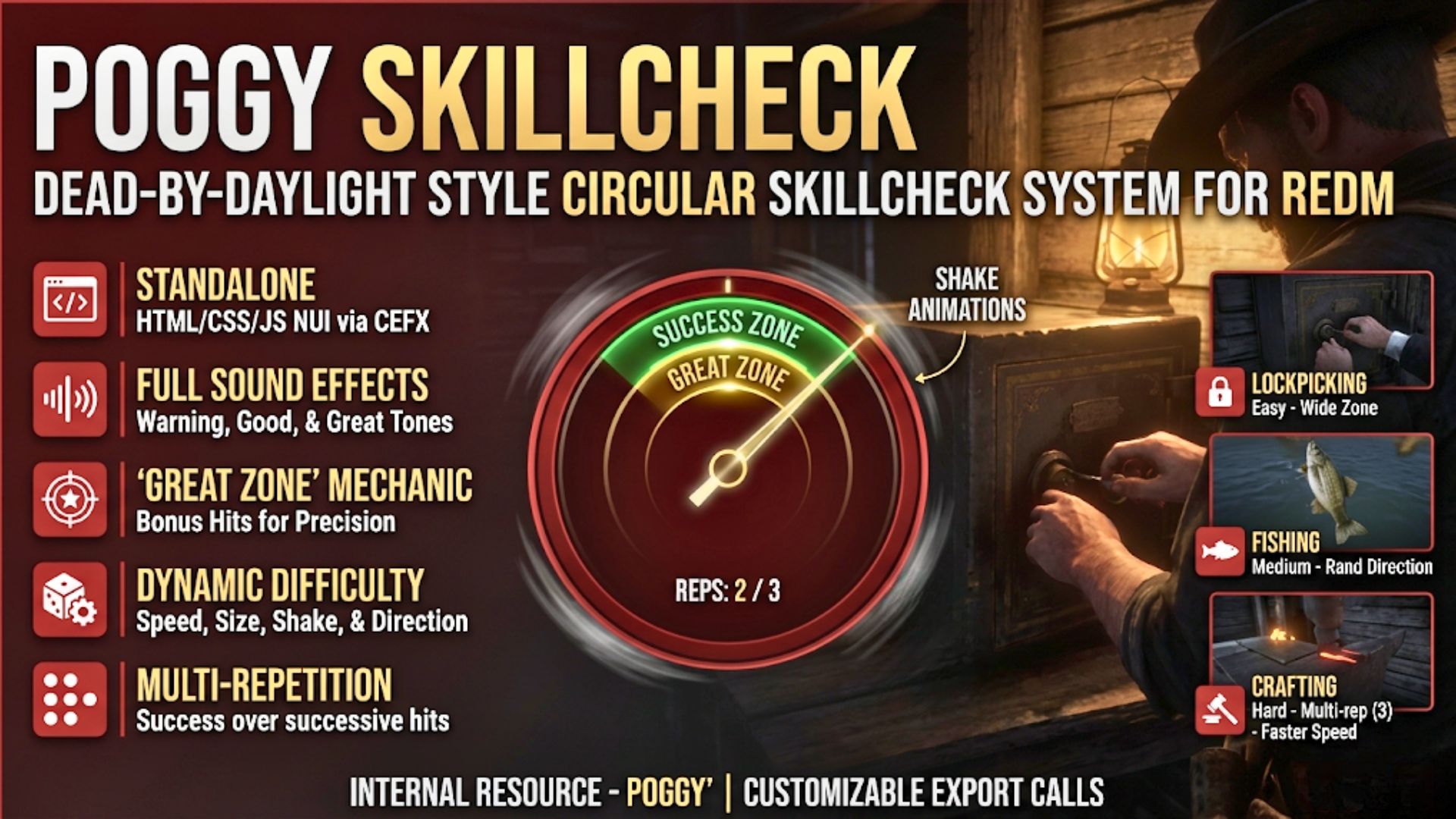
Drop a proper skillcheck into any script. Poggy Skillcheck is a standalone, canvas-rendered circular skillcheck with a rotating needle, success and great zones, multi-rep chains, screen jitter, sound effects, and a single export that blocks until the player passes or fails. Hook it into lockpicking, crafting, fishing, medical, cooking — anything. One export, ten parameters, zero dependencies.
Single Export, Instant Integration — Call exports.poggy_skillcheck:StartSkillCheck(options) from any client script. It yields until the player finishes and returns { success, great, greatCount }. No events, no callbacks, no setup.
10 Tunable Parameters — Speed, difficulty, repetitions, screen randomizer, shake, shake speed, shake distance, time between reps, needle direction, and great zone percentage. Every one is optional with sensible defaults.
Multi-Repetition Chains — Require up to 10 consecutive hits to pass. A streak counter shows the player’s progress (2 / 3). Fail any rep and the whole check fails — just like the real thing.
Great Zone Mechanic — A golden inner arc within the success zone rewards precision. Configure how much of the zone is “great” (0–100%). The return value tells you exactly how many reps hit the great zone so you can give bonus rewards.
DBD-Style Screen Jitter — Enable shake and the ring trembles in place with rapid random jitter. Scale intensity from a subtle tremor to a Doctor-tier impossible check. Five levels each for speed and distance.
Needle Direction Control — Clockwise, counter-clockwise, or random per rep. Random direction keeps experienced players on their toes across multi-rep chains.
Screen Position Randomizer — Move the ring off-center by up to 50% of the screen so the player can’t muscle-memory the same spot every time. Five levels of scatter.
Canvas-Rendered Visuals — No image assets for the ring. The entire skillcheck is drawn on a <canvas> element — crisp at any resolution with gradient needles, gold great-zone arcs, hit-flash overlays, and a red fail tint.
Sound Effects Included — Incoming warning tone, success hit, and great hit audio. Volume and incoming boost are configurable. Players can mute with /skillcheck off.
Auto-Fail on Full Revolution — If the needle completes a full rotation without the player pressing anything, the check fails automatically. No infinite spinning.
Built-In Test Command — /skillcheck [speed] [difficulty] [rep] ... lets admins and developers test any configuration instantly from chat without writing a line of code.
Zero Dependencies — Fully standalone. No framework required, no database, no bridge. Drop it in, ensure it, call the export.
Client-Side Only — No server scripts, no network traffic, no server events. The entire skillcheck runs on the client and returns a result to your calling script.
None. Fully standalone.
Call the export from any client-side thread:
Citizen.CreateThread(function()
    local result = exports.poggy_skillcheck:StartSkillCheck({
        speed      = 4,
        difficulty = 4,
        repetition = 3,
        great      = 25,
    })

    if result.success then
        if result.great then
            -- Every rep landed in the great zone
            print("Perfect craft! Bonus item.")
        else
            print("Success with " .. result.greatCount .. " great hits")
        end
    else
        print("Failed.")
    end
end)
All parameters are optional. Pass {} or nothing to use defaults.
| Parameter | Type | Range | Default | What it does |
|---|---|---|---|---|
speed | number | 1 – 5 | 3 | Needle rotation speed. 1 = slow, 5 = very fast. |
difficulty | number | 1 – 5 | 3 | Success zone size. 1 = easy, 5 = tiny. |
repetition | number | 1 – 10 | 1 | Consecutive checks required to pass. |
randomizer | number | 0 – 5 | 0 | Screen position scatter. 0 = center, 5 = ~50%. |
shake | boolean | true / false | false | Enable ring jitter. |
shakeSpeed | number | 1 – 5 | 2 | Jitter speed. |
shakeDist | number | 1 – 5 | 2 | Jitter distance. |
timeBetween | number | 100 – 500 | 250 | Ms between reps. |
direction | string | cw / ccw / rand | cw | Needle direction. |
great | number | 0 – 100 | 30 | % of success zone that counts as “great”. |
{
    success    = bool,    -- true if every rep was passed
    great      = bool,    -- true if ALL reps were great
    greatCount = number,  -- total great hits across all reps
}
Everything is in config.lua, never escrowed:
Master Toggle — Enabled = true/false to disable all skillchecks server-wide.
Global Defaults — Set the baseline for every parameter so calling scripts can pass fewer overrides.
Sound Settings — Base volume (0–1), incoming boost multiplier, and file paths for all three sound effects. Swap the .mp3 files in ui/sfx/skillcheck/ to use your own audio.
| Command | Access | Description |
|---|---|---|
/skillcheck [params...] | Anyone | Run a test skillcheck with positional args |
/skillcheck on | Anyone | Unmute skillcheck sounds |
/skillcheck off | Anyone | Mute skillcheck sounds |
Example: /skillcheck 5 5 3 2 true 4 3 200 rand 15 — max speed, max difficulty, 3 reps, position scatter, shaking, random direction, 15% great zone.
| Scenario | Example Config |
|---|---|
| Easy lockpick | { speed = 1, difficulty = 1 } |
| Crafting (hard) | { speed = 4, difficulty = 4, repetition = 3, great = 25 } |
| Fishing reel | { speed = 3, difficulty = 3, repetition = 5, direction = "rand" } |
| Surgery | { speed = 5, difficulty = 5, shake = true, shakeSpeed = 3, shakeDist = 3, repetition = 4 } |
| Quick-time event | { speed = 5, difficulty = 3, repetition = 2, timeBetween = 100 } |
| Gathering (easy) | { speed = 2, difficulty = 2, great = 50 } |
Discord: https://discord.com/invite/rBarFeuzFj
| Code is accessible | Yes (config + UI), Escrowed (client) |
| Subscription-based | No |
| Lines (approximately) | ~800 |
| Requirements | None |
| Support | Yes |
Call exports.poggy_skillcheck:StartSkillCheck(options) from any client script. It yields until the player finishes and returns success, great and greatCount. All ten parameters are optional.
No. It has zero dependencies, no server scripts and no network traffic. Drop it in, ensure it and call the export.
Speed, difficulty, repetitions up to ten in a row, screen position scatter, shake, shake speed and distance, time between reps, needle direction and the size of the great zone.
Type /skillcheck followed by the parameters in chat, for example /skillcheck 5 5 3. Players can mute the sounds with /skillcheck off. The config and UI are open; the client script is escrowed.
Poggy Skillcheck works with VORP Core, RSG Core and QBCore RedM through poggy_core, which detects the framework at runtime and has a proven adapter for each, so there is one build and nothing to configure. Skillcheck makes no framework calls at all, so it also runs on a server with no framework, or on one poggy_core has no adapter for. It requires poggy_core (free), which it starts after like every Poggy script; it makes no framework calls itself.
It is free. Add it to your basket, check out through Tebex at no charge, and download it from your Tebex account. Support is in the Poggy Discord.
What's yours stays yours Player-owned storage for RedM. Your players create a container, keep their gear in…

Overview Poggy's Admin Blips is a lightweight RedM resource that allows server administrators to see all…

See it on our store: poggy.app/store/poggy-util Eleven server utilities in one free resource. Each one has…